
Overview
What is it?
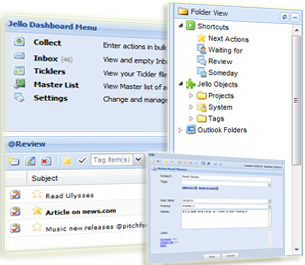
Jello Dashboard is a Getting Things Done (GTD) solution for Microsoft Outlook 2003 and above. It’s a free application released under the GPLv3 open source license, and it consists of several javascript files building a global homepage for Microsoft Outlook.
Standard Outlook data are still the base of Jello Dashboard. Tasks, appointments and contacts are managed in a more comprehensive way, following the GTD methodology by David Allen.
It can work in any PC with Outlook 2003 installed, even a locked-down company machine because it does not necessarily need installation. You can extract all files to a folder, and use it. No further alterations to your system should be made.
You can use Jello Dashboard as a complete GTD system.
Getting things done
GTD is a brilliant time-management practice and a part of its greatness lies within its do-it-yourself nature with no specific or expensive tools required for practicing it. You can GTD using a pack of cards, a standard organizer, a PDA or a cell phone, a notebook or plain paper and folders. And this is exactly the point where the whole thing gets complicated and overwhelming for lots of users. That’s the reason there is a great number of GTD applications out there for every operating system and taste.
Microsoft Outlook
Microsoft Outlook® is a popular and powerful email and time management application (especially in the corporal world) with lots of potential into the GTD field but without any implemented solutions except for the official add-in from the David Allen company which is considered to be relatively incomplete by many users.
So, I have decided to implement a new solution taking advantage of an overlooked ability of Microsoft Outlook®. The web-enabled homepage.
You can show your love by donating, share a feature-idea, translating or spreading Jello Dashboard to the world.
Search the site
Random Testimonial
- ~ D.F
 "The new version is fantastic. I have used a host of other GTD software, but I am really committed to Jello Dashboard. I love the tags.
Anyway, thank you for such a great"
"The new version is fantastic. I have used a host of other GTD software, but I am really committed to Jello Dashboard. I love the tags.
Anyway, thank you for such a great" - Read more testimonials »
What's the little bird saying?
- Some guy thought it was good to use jello-dashboard.com domain and steal my logos to build a counterfeit JD site. Avoid this site! 1 day ago
- 260+ downloads of Jello Dashboard in 2 days. Thank you! 4 days ago
- Jello Dashboard #gtd for #outlook 5.1 just released. New site is on! http://bit.ly/br2InD 6 days ago
- More updates...
Posting tweet...