
Blog updates and news.
 May 20, 2010 in News by Nick Sivridis
Jello Dashboard 5.1 beta released

Today, after almost ten weeks of development the new Jello Dashboard version is available, which comes together with a brand new web site design!
There are lots of changes and bug fixes in the 5.1 version (codenamed Valis, after the famous Philip K. Dick novel). The most important of them are:
- Addition of Project tags
- Global preview panel
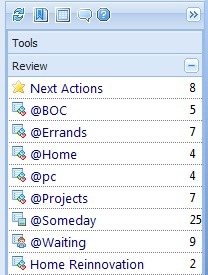
- Always available Review panel on the sidebar
- Browsing history buttons
- Tag manager screen
You can get the new version from the download section.
Please note that Jello Dashboard help is now available online from the help section. You can also download it as an e-book, since it does not come with the installation package anymore.
Thanks to the 180+ people who tested the alpha version and each of you for your support.
*One more note: If you have Jello Dashboard already installed, you will have to reset your widgets (version 5.1 will prompt you to do so) because of an upgrade to the extjs libraries to the latest version.
May 4, 2010 in News by Nick Sivridis
Jello Dashboard 5.1 (valis) alpha Available for testing

After some more days of coding I would like to announce that the alpha version of Jello Dashboard 5.1 is available for testing:
Get a copy here: http://www.box.net/shared/bx5jx6xkem
Check out version.txt for changes history
Please note:
-Testing is suggested for skilled users
-No installer is available for this version. Just unzip to a folder.
-It is suggested to install JD 5.1 in a different directory
-Backup your Outlook data before running the new version and your existing journal entry settings (if you want to use them)
-If you are using a custom journal folder/entry for your settings, keep a copy of your existing js/customSettings.js (don’t let the new files overwrite it)
-If you are using your existing settings you’re gonna have to reset your widgets. After that your settings will not be able to work with the previous version of JD.
Remember to post your thoughts or bugs you find at the new version’s forum:
http://jello-dashboard.net/forum/viewforum.php?f=10
In the meantime I will be working on the new design of the web page.
Thank you and happy GTD-ing!
April 7, 2010 in News by Nick Sivridis
Under development: Jello Dashboard 5.1
I have been forced to take a long vacation from coding, mainly because of the fact that I had to take care of my kids for long hours during the day. Maybe you know the main feeling of this: Zero free time and in no mood for anything constructive!
Anyway, things are getting a bit better now, I can have some half hour breaks during my afternoons for coding. Since a lot of you requesting information about the forthcoming release I should give you an update.
It’s been a couple of weeks since I’ve started coding again for the new 5.1 version. I’ve decided to loose the zeroes and not use the 5.00.x notation any more. It will be easier for references!
I have already made some changes in the GUI code for better resizing of panels and added an always available preview panel at the bottom of the screen.
My development plan so far, includes better integration and management of projects and a big list of bug and user interface fixes.
I would especially like to thank all of you who keep supporting the project with donations and emails. The project would be dead without you!
I will keep my twitter and facebook feeds updated on every change or addition until the first alpha release for testing, so you can follow me on twitter or become a fan of Jello Dashboard’s facebook page.
Thank you.
Nicolas Sivridis.
February 26, 2010 in News by Nick Sivridis
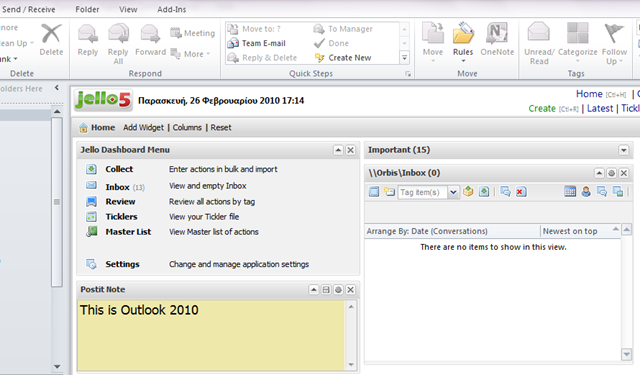
Jello Dashboard in Outlook 2010 beta
Greetings Jello Dashboard users!
It’s been a long time since my last post or code update. The truth is, I’ve been forced to take a long break from coding, due to family reasons (you know, small kids whining, tossing around toys and demand lots and lots of time).
After many questions from users about the compatibility of Jello Dashboard with the new version of Outlook currently in beta, I’ve decided to get a copy and test it. My first impressions were really positive, since everything seemed to work and the whole application was a lot faster than before.
Of course I forgot to add an Outlook view widget, or test my Outlook folder shortcuts with their default view set to Outlook mode!
The views are loading just fine at the beginning and the Outlook view control renders faster too. But when I tried to change view and go to my settings page…
Disaster!
Jello Dashboard came up with a blank screen. Removing an Outlook view widget from the homepage has the same effect.
Strangely enough this bug does not happen in the standalone version of Jello Dashboard, so I am a bit worried now.
Fortunately, the Microsoft Office 2010 version will be out probably this summer, so I think I got time to find out what’s going on.
If any of you, kind JD users, have tested Jello with Outlook 2010 and find that something else is wrong, please drop a comment here and let me know.
I hope this bug (or any others found) will be fixable and you will be able to hear from me soon!
Thank you for your support.
August 7, 2009 in News by Nick Sivridis
Jello Dashboard 5.00.6 beta
 Since my vacation time was earlier for this year, I had decided to keep myself indoors for some hours to support Jello Dashboard users.
The 6th release fixes lots of bugs and even has to show off some small scale new features!
Thanks everyone for downloading and supporting Jello Dashboard. It may be the best way to GTD with MS Outlook.
Have a great summertime!
Changes (loong) list:
- Fixed: Tag sort order on tree and combo boxes
- Fixed: Go to folder combo box now match international characters
- Added: Tickler popup: Cached list of ticklers for faster rendering. Refresh the list using the date selector button.
- Added: Ability to edit the body text of a tickler or task from the body popup display.
- Added: right context menu to set / change due date for mail and task items.
- Added: Right click context menu for ticklers widget
- Added: “View this Contact” context menu item into inbox and mail folder views: This will open the contact item of the sender. If ambiguous, a box will popup to allow you to select the correct contact.
- Fixed: Right click context menu behavior didn’t match Outlook. Now, if you click on an item that isn’t selected, that single item will be used for the item to be processed. If you right click on any of a set of selected items, all items will be processed.
- Added: When viewing the body of an email, you can toggle the viewing mode between html and plain text using the Toggle view button.
- Fixed: Made the goto box a bit wider and resizable
- Added: Preview panel at the bottom of the action lists. It will use the height and font size of the mail preview panel. Notes, if they exist, are shown at the top of the preview window and display the body of items.
- Added: Using OL2007 and you having notes updated to the body via the setting, notes will be added as text to the body. They will be delimited with “<– Jello Notes –>” before and after the notes. Any text between the delimiters is treated as notes. You may edit this text in Outlook.
- Fixed: Smart date bug where format was being reversed is fixed and advanced collect handling of dates was adjusted.
- Fixed: The date field in the form for editing/creating an action can now hadle a 4 digit year
- Added: Experimental setting for using OL2007 “due date” field of email items for storing due dates on emails.
- Fixed: Unknown tags will not be converted in review screen due to tag lost issue
- Fixed: Inbox and Outlook widget’s archive only button not under a menu anymore for better use
- Added: Notification alert when trying to leave collect screen containing uncollected text
- Added: Setting for Outlook view and Outlook widget for OL2007 to display a bit lower so the screentips can be seen
- Fixed: Outlook view and Outlook widget can now process an email with empty subject
- Fixed: Action File attachment and link to action
- Fixed: Advanced settings editor cancel value was dispaying a dev alert
- Added: Date picker customization by the language file
- Fixed: First weekday on date pickers is now Monday as requested
- Added: Setting for sending task requests to assigned action contact (when one)
- Fixed: Inbox counters now showing correct number even if show only tasks in inbox setting is checked
- Added: New setting to select using Goto folder window for selecting folder when moving emails (checked by default)
- Added: Sidebar menu icon to toggle Outlook preview pane easily
- Fixed: Encrypted emails do not cause errors anymore. They show with a lock icon and the user cannot manage them
- Added: Clicking the attachment icon of a message in Inbox view will open up the message
- Added: Shortcut key for refresh (ctrl+S) in action lists
- Added: Closing the Ticklers popup window hides it without unloading data for re-opening speed.
- Added: Alert if no contacts are selected for delegation via the select contact popup form
- Added: Envelope icon and status for delegated tasks sent by email
- Fixed: Inbox and Action editor tag list combo are reloaded after new tags are inserted by typing
- Fixed: Bug caused pop up error msg and tag disapperance When renaming tags
- Fixed: System tags (those contained in the System folder) can be moved like any other tag
- Fixed: Outlook view widget tag combo refreshes when a new tag is added by typing
- Fixed: Hiding Outlook view controls when displayng the Latest form and the Delete task of linked item dialog box
- Added: Archived checkbox for tags. Check to hide a tag from all lists
- Fixed: Error message instead of js error when archiving an item into the same folder it already is
- Fixed: Outlook widget disabling when deleting entries
- Fixed: Improved importing of existing categories as tags from the Settings menu
- Added: Setting to startup to other screens besides home
- Fixed: Creating action from Outlook widget’s email format message body correctly
- Updated: Documentation link no longer appears into the important widget. Moved to sidebar menu.
- Fixed: Setting the jello priority field to high (1) for an action sets the Outlook item to high priority as well
- Fixed: Due date setting on inbox item
- Fixed: Latest window with action editor screen unusable bug
- Fixed: Non-archiving multiple items with custom archive folders
- Fixed: Level up toolbar button for subtags
- Added: Settings function to import existing categories as jello tags from any Outlook folder
- Added: “Make multiline entry” command in Advanced collect toolbar. It takes the selected lines in the collect area and place the line continuation character
May 30, 2009 in News by Nick Sivridis
Web site recovered

Some of you might notice that the Jello Dashboard web site and forum were not available for the last 48 hours.
My former hosting provider had a major server accident, resulting in total loss of data.
Fortunately there were some February backups of the web site and I managed to recover my old posts. The Jello forum did not have the same luck. Everything is lost, users, posts and answers. It’s the second time something like that happens.
The new forum is up and running and you can start posting and registering. This time I will not forget to backup things!
Sorry to all of you who are subscribed to Jello Dashboard’s feed. I hope I did not get you mad sending wordpress default posts and older ones in your feed reader or mail.
Thanks for understanding.
Nicolas Sivridis
May 15, 2009 in News by Nick Sivridis
Jello Dashboard 5.00.5 beta
I have just finished the fifth update (a really important one) to Jello Dashboard. It is almost a month earlier but regarding its importance it had to be ready as soon as possible.
This release fixes many bugs, but introduces a small number of new features although the users request list is getting bigger!
New Featrures for 5.00.5
- User’s last Sort order is now saved in grids
- A right click context menu to all views!
- Abillity to change theme from the Settings screen/Core combo box (4 themes just for testing for the time being)
- Go to folder function. Fires with ctrl+G from any screen and lets user enter an Outlook folder name to navigate to
- Abillity to manual edit currently used settings. This is intented for advanced users or developers.
*You really should check out the Go to function. Pressing Ctrl+G gives you the ability to immediately navigate to any outlook folder or Jello tag by typing some characters of its name.
Changes for 5.00.5
- Updated: Extjs libraries to version 2.2.1
- Fixed: Issue on tree trag and drop between tags creating orphans and loosing all tags
- Fixed: Advanced collect errors while creating contacts (other contact data)
- Fixed: Cancelling tag creation from inbox combo
- Fixed: Tasks created from Outlook view emails now get body text from them
- Fixed: Inbox error when setting due date on task by popup calendar menu
- Fixed: Outlook view widget Selection/Tag/Archive errors (line 27 etc)
- Added: Extra toolbar buttons on Outlook view widget (reply,delete)
- Fixed: Narrower tags combo on Outlook view widget to save space
- Fixed: Outlook view widget:Truncate big widget titles
- Fixed: Error generated for tags using the ‘&’ character. & added to the restricted characters list for tag naming
- Changed: Collect popup shortcut key to Ctrl+W
- Fixed: Weekly printout several fixes and it can be now produced from the masterlist view too.
- Added: Weekly printout form new field addition to specify how many characters of the body text are displayed for each task
- Added: if the to line of an email has more than one recipient it will be displayed in the preview pane of an email folder view. if there are any cc’s, the cc line will be displayed.
- Added: Inbox view is now groupped by type.
- Removed: New tag and up level toolbar buttons from review screen since they created errors or being unusable
- Fixed: Inbox task duplication on due date set and archive
- Fixed: several fixes to auto-update for the inbox
- Fixed: Inbox move to folder function now uses the go to folder form to quickly search for an outlook folder by typing
- Added: Deleting a task with a linked message results now a confirmation to Delete, Move the linked message or Cancel to leave it intact
- Fixed: Restoring a backup of a settings set retains the original backup and creates another backup of the last used set
- Updated: Search box is now a full panel right above the tree
- Updated: Sidebar toolbar includes Go to function (Ctrl+G) which lets user quickly navigate to an oulook folder or jello tag by typing
- Fixed: Hierarchy sort order of tags is now case insensitive
- Fixed: Bogus tag/folder addition into active list if a new tag was created from the hierarchy (anywhere). It shows now if the current view is the new tag’s parent.
- Added: New setting to mark/not mark outlook messages as read when viewed from jello
- Added: Post it popup now displays and updates the contents of the first post-it widget the user has in the homepage.
Thanks everyone for your reports, observations, supporting Jello by donating, translating and spreading by joining its Friend Connect user list and the facebook group!
Subscribe to feed if you want to be notified on Jello Dashboard’s updates!
March 4, 2009 in News by Nick Sivridis
Jello 5 and Microsoft Outlook connector

There were several strange and unresolved reports from Jello Dashboard users about a mysterious line 14 error which couldn’t be reproduced. They were not so much, but enough to drive me crazy.
Until one user reported using a Microsoft utility to manage hotmail accounts inside Outlook: The Microsoft Outlook Connector.
I immediately downloaded the product and installed it. Started Outlook and tried to run Jello.
As you can imagine I found an incompatibility with Jello Dashboard. For reasons unknown Jello Dashboard cannot run in Outlook if the Microsoft Outlook connector is installed.
Fortunately, you can run it without problems though standalone using the jello5.hta file.
So if you have been unable to run Jello Dashboard from your Outlook, this might be the reason.
February 27, 2009 in News by Nick Sivridis
Jello 5.00.2 update release
The second update release includes a lot of fixes to annoying and really annoying bugs reported by many users in the Jello.forum over the last days.
There are a couple of new features too.
February 17, 2009 in News by Nick Sivridis
Jello 5 beta is out!

Hello everyone!
After 7 months of development, drawbacks, bugs, fixes and more bugs the new version of Jello Dashboard (codename:starbot) is ready and available for download.
The product has just left the alpha status and became a beta. That means that there should still be bugs and some errors may occur from time to time. All bugs should be posted to the forum.
There are plenty of changes and new features added, but most importantly the whole project is following a different work flow, more close to GTD in its simple form. Of course not everyone will like those fundamental changes but its all for the good. Continue reading “Jello 5 beta is out!” »
Search the site
Random Testimonial
- ~ D.F
 "The new version is fantastic. I have used a host of other GTD software, but I am really committed to Jello Dashboard. I love the tags.
Anyway, thank you for such a great"
"The new version is fantastic. I have used a host of other GTD software, but I am really committed to Jello Dashboard. I love the tags.
Anyway, thank you for such a great" - Read more testimonials »
What's the little bird saying?
- Creating an #outlook to #tiddlywiki sync function to help you get your #gtd jello dashboard data anywhere.I hope it works! 2 days ago
- Some guy thought it was good to use jello-dashboard.com domain and steal my logos to build a counterfeit JD site. Avoid this site! 2 weeks ago
- 260+ downloads of Jello Dashboard in 2 days. Thank you! 2 weeks ago
- More updates...
Posting tweet...